Chasers
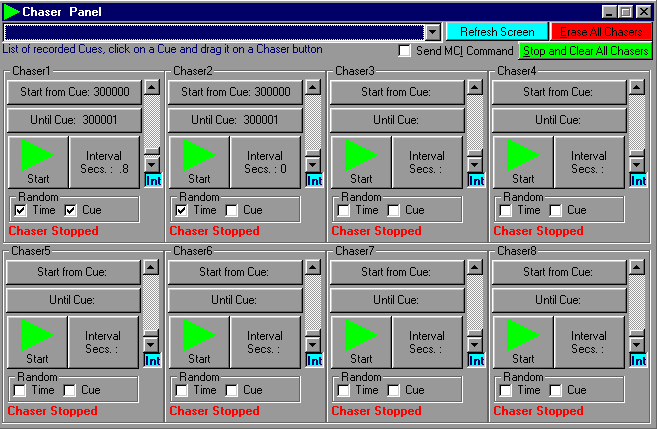
A Chaser is a sequence of Cues that may be running in parallel to a crossfade, following a predefined time sequence.
In the ProScenium, there is a visual Chaser window that allows you to access directly all 8 Chasers and change parameters.

You can easly fill the chaser parameters, just selecting a cue in the upper Combo-Box(this action activate the Drag Mode), and Drop the cue in one of the 8 Start from Cue/Until Cue buttons.
You can erase one or multiple chasers just clicking on the Erase Chaser button.
Reading this Section will help you to understand how the Chaser mechanism works
Chasers may be activated from the "Chaser" menu, from the keyboard with keys "E","R","T","Y","U","I","D","F", in toggle mode, or inserted from the MCI command of the menu editor. Accepted commands are the following (using Chaser 2 as an example):
Chaser2 on
Chaser2 off
Chaser2 Cue 10 (starts a Chaser from Cue N. 10)
Chaser2 int 2 (fixes a 2 second Interval for a not fading Chaser)
Chasers on (start all assigned Chasers)
Chasers off (stop all assigned Chasers)
Chaser1 tog (if Chaser1 was started it stops, if it was stopped it starts)
Chaser1 step (goes to next step in the Chaser)
Chaser1 rel (starts the first Chaser reloading it from the beginning, also if the Chaser is already running)
Chaser1 rti 1 (Sets the Time Random option on)
Chaser1 rcu 1 (Sets the Cue Random option on)
Chaser1 rti 0 (Sets the Time Random option off)
Chaser1 rcu 0 (Sets the Cue Random option off)
You may also select the Chasers option from the recording panel to auto-fill these fields.
BE CAREFUL TO RESPECT THE EXACT SYNTAX (keywords, blanks) IN MCI COMMANDS
Alternatively, one of the following options in the Chaser Window may be selected:
Start from Cue
This allows selection of the Cue from which a Chaser should start. At the end of the sequence (unless a link is encountered) the Chaser will restart from this Cue.
Ensure that you enter the correct link sequence, and ensure that you are aware of the jumps you make in the sequence using links. Chaser links are the same as normal links, so changing links for the Chasers, means also changing links for normal crossfade operations.
For example, if you make Cues
1000
1001
1002
1003
and from the Cue edit window you link 1003 to 1000 (writing 1000 in the link field for Cue 1003)
and then you make Cues
2000
2001
2002
2003
and from the Cue edit window you link 2003 to 2000 (writing 2000 in the link field for Cue 2003)
And so on....
Chaser Interval

This allows you to select the interval (in seconds) between a Cue and the next one. For example, use 1.5 for a second and a half or 0.3 for a third of a second.
If you leave this interval at 0, or do not enter a Chaser interval, each Chaser will fade through each step will automatically taking the Cue Time In.
If you check the Random Time box, the interval will be selected in random mode, from 0 to the selected interval, this option is useful to make a random strobe, or a fire-kind effect with conventional lighting.
If you check the Random Cue box, the next step in your chaser will be selected in random mode, between the cues that compose your chaser.
Start Chaser (key E,R,T,Y,U,I,D,F)

Starts selected Chaser. The same effect may be obtained in the Cue Editing window, using the editing command and loading in the MCI command column the "Chaser 1 on" command (without quotes of course). In this case when the related crossfade will be started, the selected Chaser will be started.
Stop Chaser (key E,R,T,Y,U,I,D,F)

Stop selected Chaser. The same effect may be obtained in the Cue Editing window, using the editing command and loading in the MCI command column the "Chaser 1 off" command (without quotes of course). In this case when the related crossfade will be started, the selected Chaser will be stopped.
In normal resolution timer mode, it is possible to trigger also the MCI commands present in the different Cues that compose a Chaser.
Using this idea it is possible to have several complete multitasking activities, or to stop a Chaser after a cycle by putting, for example, for Chaser No. 1, the "Chaser 1 off " command.
Contents